


What Is Included in a Professional Boardroom AV Installation?
A boardroom is not a room that gets a second chance to make a first impression. When a client walks in for a pitch, when the board convenes for a critical decision, when an executive presents to the entire organisation, the technology in that room either supports the moment or undermines it. There is no neutral outcome.
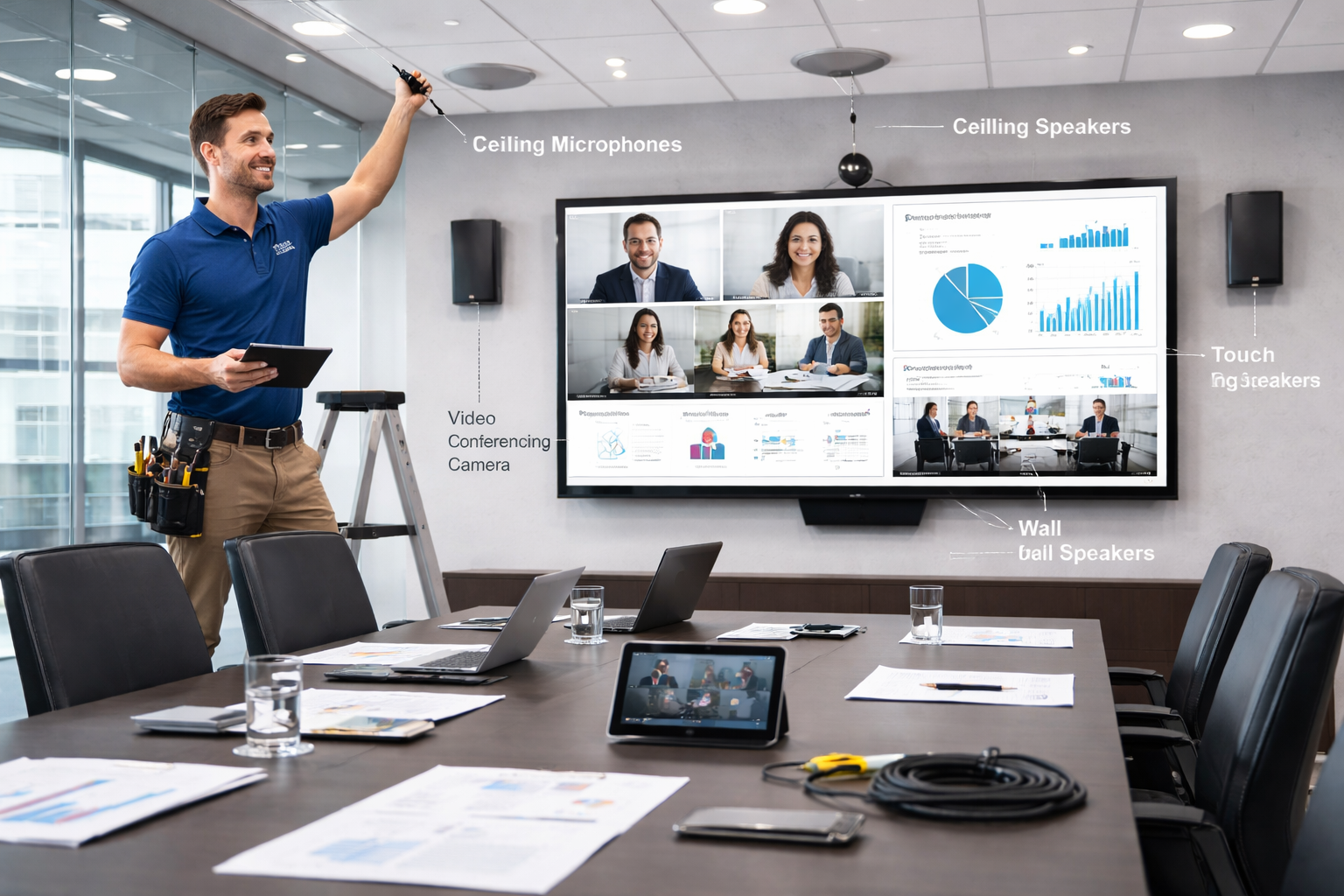
A professional boardroom AV installation is not simply a matter of mounting a large screen and connecting a camera. It is a system design process that integrates display technology, audio, video conferencing, cabling infrastructure, automation, and control into a single environment that works reliably, looks professional, and can be operated by anyone in the room without technical assistance.
This article covers every element of a professional boardroom AV installation, what it includes, why each component matters, and what separates a system that performs consistently from one that becomes a source of ongoing frustration.
System Design: Where a Professional Installation Begins
The most important part of a boardroom AV installation happens before a single component is purchased or a single cable is run. It happens at the design stage, and it is the stage that most distinguishes a professional installation from an ad hoc one.
A thorough system design begins with a detailed assessment of the boardroom itself. Room dimensions, ceiling height, wall construction, seating layout, ambient light conditions, existing electrical and data infrastructure, and the primary use cases for the room all feed directly into the system specification.
A boardroom that is used primarily for video conferencing has different requirements than one primarily used for presentations. A room with floor-to-ceiling windows facing north in a Sydney CBD tower has different display and lighting requirements than an interior room with controlled lighting.
The output of the design stage is a system specification that documents every component, its placement, its configuration, and how it integrates with every other component in the room. This specification is the foundation for the installation, the testing, and the ongoing maintenance of the system.
For Sydney businesses commissioning a boardroom AV installation, requesting a documented system design before any procurement decision is made is one of the clearest indicators of whether the installer is operating at a professional level.
Display Configuration: Sized and Specified for the Room
The display system is the visual centrepiece of the boardroom and the component that every meeting participant interacts with most directly. Getting it right requires decisions about size, configuration, technology, and placement that are specific to the room, not generic.
Sizing for the Furthest Viewing Position
Display size in a boardroom should be determined by the furthest seated participant’s viewing distance, not by budget or aesthetics.
The practical guideline is that the furthest participant should be able to read standard text on screen without straining, which translates to a minimum of 86 inches for most boardroom configurations, and larger for rooms where the furthest seat is six metres or more from the display.
Undersizing the display is one of the most common boardroom AV mistakes, and it affects every meeting the room hosts for the life of the installation. It is worth specifying correctly from the outset.
Single vs Dual Display
A single display configuration asks local participants to choose between watching remote attendees and watching the content being presented.
In most boardroom meetings, where both matter, this is a friction that accumulates across every session and makes hybrid meetings noticeably less effective.
A dual display configuration resolves this directly. One screen carries the video call. The other carries shared content. Local participants can maintain natural visual engagement with remote attendees while simultaneously referencing the presentation, document, or data being discussed.
For boardrooms used regularly for hybrid meetings, a dual display configuration is not a premium option, it is the appropriate specification.
Commercial-Grade Displays
Commercial-grade displays are specified for boardroom environments for clear operational reasons. They are designed for extended daily operating hours, carry longer commercial warranties, offer higher brightness output for variable ambient light conditions, and include the connectivity and control interfaces required for professional AV integration.
Video conferencing equipment for boardroom environments, including commercial display options, is available through Sydney Audio Visual Specialists.
Camera System: Professional Coverage for a Large Room
A boardroom camera system needs to capture a large room, a long table, and a variable number of participants reliably and professionally, and deliver that experience consistently to remote participants who are forming their impression of the meeting environment through what they see on screen.
PTZ Cameras and Auto-Tracking
Professional boardroom camera installations typically use PTZ cameras, units that can pan horizontally, tilt vertically, and zoom optically without being physically repositioned.
This allows the camera to reframe from a wide room shot to a closer view of the active speaker, or to focus on a presentation area or whiteboard, without manual intervention.
Auto-tracking and auto-framing are now common in professional boardrooms. These systems use audio cues or computer vision to detect the active speaker and automatically adjust the camera, ensuring a professional remote meeting experience without manual operation.
Camera Placement and Mounting
Camera placement in a boardroom is a specialist design decision. The camera needs to be positioned at a height and angle that produces a natural, eye-level perspective for remote participants, not looking down from a ceiling mount or up from a low credenza.
For boardrooms that seat participants on both sides of a long table, multiple cameras may be required to ensure all participants are visible to remote attendees regardless of where they are seated.
Camera switching logic, determining which camera feed is presented at any given moment, is managed through the room’s control system and requires careful configuration during the commissioning stage.
Audio System: The Most Technically Demanding Element
Remote participants experience a boardroom meeting almost entirely through sound. A display system that is one generation behind the current standard is an aesthetic compromise.
An audio system that does not capture every participant clearly is a functional failure that makes meaningful remote participation genuinely difficult.
Professional boardroom audio is the most technically complex element of the installation, and the element where the gap between a professional system and a consumer-grade one is most apparent.
Microphone Coverage
The fundamental challenge of boardroom audio is consistent coverage across a large room and a long table. This is not a placement problem that can be solved through repositioning, it is a coverage problem that requires a distributed microphone solution.
Professional boardroom microphone systems use ceiling-mounted microphone arrays, multiple tabletop microphone pods distributed along the table, or a combination of both.
The goal is for every participant to be picked up at a consistent volume level regardless of where they are seated, so that remote participants cannot identify who is near the microphone and who is at the far end of the table.
Digital Signal Processing
A Digital Signal Processor, DSP, is the component that manages the audio signal between the microphones and the video conferencing platform. It handles echo cancellation, noise reduction, gain management across multiple microphone zones, and level balancing to ensure the combined audio output is clean, clear, and consistent.
In a professional boardroom setup, a dedicated external DSP integrates microphones, speakers, and the video conferencing platform into a single coherent audio system, preventing interference and inconsistency.
The quality of the DSP configuration, the time spent calibrating it to the specific acoustic characteristics of the room, is one of the clearest indicators of the technical expertise of the installation team.
Speaker System
The in-room speaker system reproduces audio from remote participants and shared media for local attendees.
In a professional boardroom installation, ceiling speakers distributed across the room provide more consistent coverage than a soundbar or display-integrated speakers, ensuring all participants can hear clearly regardless of seating position.
Speaker placement should be coordinated with microphone placement during the design stage. Poor positioning can cause feedback and echo issues that DSP alone may not fully resolve.
Cabling Infrastructure: The Foundation Everything Else Runs On
Cabling is the element of a boardroom AV installation that is most invisible when done correctly and most disruptive when done poorly.
A professional cabling installation is not simply a matter of running the correct cable between components, it is a structured approach to cable routing, termination, labelling, and management that determines the long-term reliability and serviceability of the entire system.
In-Wall and In-Ceiling Cable Routing
Professional boardroom installations route cables within walls, floors, and ceilings rather than using surface-mounted conduit wherever possible.
This produces a cleaner visual result, protects cables from physical damage, and complies with the building and electrical standards applicable to commercial fit-outs in Australian office environments.
Cable routing decisions are made at the design stage and need to account for the full system, not just the primary signal cables.
Power cabling, control cabling, network cabling, and AV signal cabling all need to be routed and managed consistently to avoid interference and to ensure the system remains serviceable when components need to be replaced or upgraded.
Labelling and Documentation
Every cable in a professional boardroom AV installation should be labelled at both ends and documented in a cabling schedule that forms part of the system’s as-built documentation.
Labelling cables correctly is not an administrative formality, it is what allows a technician to diagnose and resolve a fault quickly and accurately without needing to trace cables physically across the room.
A boardroom that has been professionally installed and correctly documented is significantly easier and cheaper to maintain and upgrade over time than one where the cabling was installed without documentation.
This is particularly relevant for Australian businesses planning for a ten-year asset life from their boardroom investment.
Automation and Control: Making a Complex Room Simple to Operate
A boardroom AV system that requires technical knowledge to operate is not a functional meeting environment. The complexity of the system needs to be invisible to the people using it, absorbed by the control system and the automation logic that sits behind a simple, intuitive interface.
Touch Panel Control
Professional boardroom installations include a touch panel, typically wall-mounted at the room entry and table-mounted for in-meeting management, that provides a single interface for all room technology.
Starting a call, joining a scheduled meeting, selecting a content input, adjusting audio levels, managing the display, and controlling room lighting and blinds should all be accessible from this panel without requiring any technical knowledge from the user.
Programming the control system is a specialized task that requires understanding how the room will be used, the most common actions, the most intuitive interface layout, and the automation needed to simplify routine operations.
A control system that is poorly programmed produces a room that generates ongoing IT support requests.
A well-programmed control system makes the room feel simple to operate regardless of the technical complexity behind it.
Automation Logic
Beyond manual control, professional boardroom installations include automation logic that manages routine operations without user input.
When a meeting starts, the displays power on, the camera adopts its default framing, the audio system activates, and the room lighting adjusts to the appropriate level, automatically, as part of a single-touch join sequence.
When the meeting ends, the system powers down in the correct sequence without requiring the user to manage each component individually.
This automation reduces the cognitive load on meeting participants, eliminates the fumbling start to meetings that poorly designed rooms produce, and ensures the system is consistently in the correct state at the beginning of each session.
Video Conferencing Integration: Platform Compatibility and Certification
The video conferencing platform, Microsoft Teams, Zoom, Google Meet, or another, should be determined before the hardware specification is finalised. Each major platform has a certified hardware ecosystem, and equipment certified for one platform is not always fully compatible with another.
Certified hardware has been tested to work reliably with the platform’s specific call handling, audio processing, display management, and calendar integration requirements.
Non-certified hardware in a certified platform environment introduces integration gaps that create the intermittent, difficult-to-diagnose reliability problems that generate ongoing support costs.
For Australian businesses running Microsoft 365, a Teams Rooms certified system is the most integrated and supportable specification.
For organisations primarily using Zoom, Zoom Rooms certified hardware is the appropriate choice. Video conferencing equipment certified for the major platforms is available through Sydney Audio Visual Specialists, confirm compatibility with your specific platform and IT environment before finalising the specification.
Installation, Commissioning, and Handover
A professional boardroom AV installation concludes with a commissioning process that tests every component and every integrated function of the system before handover to the client.
It is a structured process that verifies audio coverage at all seats, camera framing for all presets, control system performance in every scenario, display performance across inputs, and integration across all call types.
The commissioning process produces a test record that forms part of the system’s handover documentation alongside the as-built drawings, cabling schedules, equipment schedules, and programming documentation.
This documentation is what allows the system to be maintained, serviced, and upgraded efficiently over its operational life.
Staff training at handover ensures that the people responsible for using and managing the room can do so confidently without relying on external technical support for routine operations.
The length and depth of the training depends on the complexity of the system and the technical familiarity of the users.
Common Mistakes in Boardroom AV Installations
Specifying the system without a room assessment produces mismatched components that underperform in the specific environment they are installed in.
Prioritizing display quality while neglecting audio is a major mistake. Remote participants experience meetings mainly through sound, so poor audio can undermine the entire experience regardless of the visual setup.
Selecting non-certified hardware for the organisation’s primary video conferencing platform introduces compatibility problems that cannot be resolved through configuration alone.
Using consumer-grade components in a commercial environment creates reliability and longevity problems that consume the initial cost saving in maintenance and early replacement.
Treating the control system as an afterthought rather than a design priority produces rooms that are technically capable but operationally frustrating, and that generate ongoing IT support requests from users who cannot operate the system confidently.
Failing to commission and document the system thoroughly at the end of the installation creates a maintenance and serviceability problem that compounds over the life of the asset.
Talk to Sydney Audio Visual Specialists About Your Boardroom
Ready to invest in a professional boardroom AV installation that works reliably from day one? Explorevideo conferencing equipment or contact Sydney Audio Visual Specialists to request a consultation tailored to your boardroom.Contact Sydney Audio Visual Specialists
Not sure what your boardroom actually needs or where the gaps are in your current setup? Speak with the Sydney Audio Visual Specialists team for honest, practical advice before you commit to any specification or installation.Get in touch today
Frequently Asked Questions
What is included in a professional boardroom AV installation?
A professional boardroom AV installation includes system design, commercial display configuration, professional camera system, distributed audio with DSP processing, structured cabling infrastructure, automation and control system with touch panel, video conferencing platform integration, commissioning, and documented handover.
How is a boardroom AV installation different from a standard meeting room setup?
Boardroom installations are more technically complex and involve a higher level of system integration than standard meeting rooms. They typically require professional PTZ camera systems, distributed ceiling microphone arrays, dedicated DSP audio processing, centralised control systems with custom programming, and full system documentation.
Why does audio quality matter so much in a boardroom AV system?
Remote participants experience the meeting almost entirely through sound. Poor audio, inconsistent pickup, echo, background noise, or level imbalance across the table, makes remote participation genuinely difficult and creates a negative impression of the organisation regardless of the visual quality of the setup.
What is a DSP and why is it needed in a boardroom?
A Digital Signal Processor manages the audio signal between microphones and the video conferencing platform. It handles echo cancellation, noise reduction, gain management, and level balancing across multiple microphone zones.
What does platform certification mean for boardroom AV equipment?
Platform certification means the hardware has been tested and verified to work reliably with a specific video conferencing platform, Microsoft Teams, Zoom, or Google Meet. Certified hardware integrates fully with the platform’s call handling, calendar, and audio management features. Non-certified hardware introduces compatibility gaps that create intermittent reliability problems and limit access to platform support resources.
How important is the control system in a boardroom AV installation?
The control system is what makes a technically complex room operationally simple. A well-designed and programmed control system allows any meeting participant to start a call, manage audio, select inputs, and control the room environment from a single touch panel without technical knowledge.
What cabling standards apply to a professional boardroom AV installation in Australia?
Commercial AV cabling in Australian office environments needs to comply with relevant Australian Standards for electrical installation and cabling in commercial buildings. Cable routing within walls and ceilings must meet building code requirements for the relevant commercial tenancy.
How long does a professional boardroom AV installation take?
Installation duration depends on the scope and complexity of the system, the condition of the existing infrastructure, and the access arrangements for the room. A straightforward installation in a room with good existing infrastructure may be completed in one to two days.
What ongoing maintenance does a boardroom AV system require?
Professional boardroom AV systems require periodic hardware checks, firmware and software updates, microphone and camera calibration, control system review, and cable and connection integrity checks to maintain consistent performance over time.
Can an existing boardroom be upgraded rather than fully reinstalled?
In many cases, yes, existing components that are commercially rated, in good condition, and compatible with the new system specification can be retained and integrated into an upgraded installation.
About Sydney Audio Visual Specialists
Sydney Audio Visual Specialists provides tailored audio visual solutions including AV equipment hire, product sales, installation, repair, and maintenance. The team supports a wide range of client types and environments, including schools, boardrooms, hotels, meeting rooms, auditoriums, showrooms, commercial shopfronts, and corporate facilities, with a focus on reliable service and honest advice.